A few years ago, building a website with genuine AI functionality required a development team, a substantial budget, and months of work. That barrier has collapsed. No-code AI website builders now let individuals, freelancers, and small business owners create websites that adapt to visitors, respond to questions, and personalize content — all without writing a single line of code.
The process is more accessible than most people assume. What it requires isn’t technical skill — it’s clarity about what the website needs to do and a structured approach to building it.
Choosing the Right Foundation for an AI-Powered Website
The platform you build on determines which AI features are available, how much customization is possible, and what the site will cost to maintain. Not every website builder offers meaningful AI integration — some use the term loosely to describe basic template suggestions rather than genuine intelligent functionality.
What to evaluate before committing to a platform:
- Native AI content generation that drafts page copy, product descriptions, and blog posts directly within the builder — not just a connection to an external writing tool
- AI design assistance that suggests layouts, color schemes, and section arrangements based on your industry and goals rather than presenting static templates
- Built-in chatbot functionality with natural language understanding, not scripted button-click flows that frustrate visitors with limited responses
- Visitor behavior personalization that displays different content, offers, or calls to action based on how a user arrived, what they’ve viewed, or where they’re located
- AI SEO tools that analyze page content and suggest optimizations for search visibility during the build process, not as an afterthought
- Integration capability with external AI tools — email automation, CRM systems, analytics platforms — so the website functions as part of a connected workflow
- Scalability without code meaning advanced features can be added as the business grows without migrating to a different platform or hiring developers
Platforms that offer most of these capabilities natively provide the strongest foundation. Those that rely heavily on third-party plugins for AI functionality introduce complexity and potential compatibility issues that create problems later.
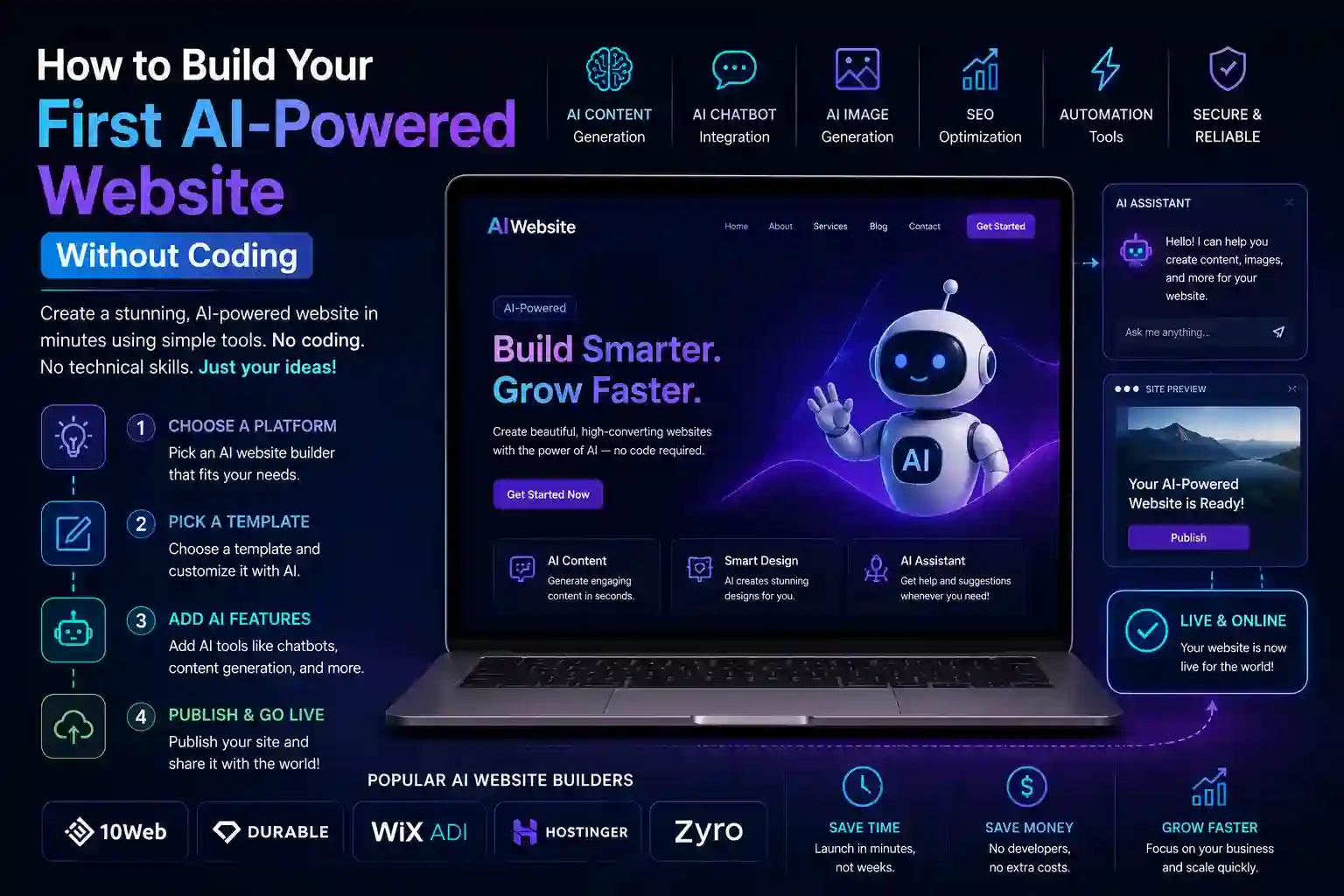
Step-by-Step Process to Build Your AI-Powered Website
Once a platform is selected, the actual build follows a logical sequence. Rushing through early stages — particularly goal definition and content — consistently produces websites that look finished but fail to perform.
- Define the website’s primary objective before touching any builder — lead generation, e-commerce sales, appointment booking, or information delivery each require different page structures and AI feature priorities.
- Use AI content generation to draft core pages — homepage, about, services or product pages, and contact — using the platform’s built-in tools, then refine the output to match your specific voice and offering.
- Configure the AI chatbot with your most common visitor questions, clear escalation paths for complex queries, and a tone that matches your brand — generic out-of-box chatbot responses undermine trust rather than build it.
- Set up personalization rules that serve different content to new versus returning visitors, or adjust calls to action based on the traffic source — a visitor from a paid ad needs different messaging than one arriving from an organic search.
- Connect AI-powered email capture that qualifies leads through conversational forms rather than static fields — asking two or three contextual questions produces far more actionable contact data than name and email alone.
- Implement AI SEO analysis on each completed page, addressing flagged issues with title tags, meta descriptions, heading structure, and keyword placement before publishing.
- Test the AI features from a visitor perspective — complete the chatbot conversation yourself, trigger the personalization rules, and submit the lead capture form to verify everything functions as intended before driving traffic.
Maintaining and Improving an AI-Powered Website Over Time
Launching the site is the beginning of the process, not the end. AI-powered websites generate behavioral data that reveals exactly how visitors interact with every feature — which chatbot questions go unanswered, which personalized offers convert, which pages lose visitors before they take action.
Reviewing this data monthly and making specific adjustments based on it — updating chatbot responses, refining personalization triggers, improving page sections with high exit rates — is what separates websites that improve continuously from those that stagnate after launch.
AI website builders also release new features regularly. Setting aside time quarterly to explore updates ensures the site takes advantage of capabilities that weren’t available at launch without requiring a complete rebuild.
The websites that perform best eighteen months after launch aren’t necessarily the ones with the most sophisticated initial build — they’re the ones whose owners treated them as living systems rather than completed projects.
Conclusion
Building an AI-powered website without coding is genuinely achievable for anyone willing to approach the process methodically. The technology handles the complexity — content generation, visitor personalization, intelligent conversation, SEO analysis — while the builder focuses on clarity of purpose and quality of execution. Start with a platform that offers strong native AI features, build systematically through each stage, and commit to ongoing optimization based on real visitor behavior. That combination produces a website that works harder than a static page ever could.
Frequently Asked Questions
Q1: Do I need any technical skills to build an AI-powered website?
No technical skills are required. Modern AI website builders use visual drag-and-drop interfaces for design and guided setup flows for AI features like chatbots and personalization. If you can use a word processor and make basic design choices, you have the skills needed to build and manage the site.
Q2: How much does it cost to build an AI-powered website without coding?
Costs vary by platform and features required. Entry-level plans with basic AI functionality typically start between $15 and $30 per month. Plans with advanced personalization, e-commerce AI, and chatbot capabilities generally range from $40 to $100 per month — significantly less than hiring developers for equivalent functionality.
Q3: Can an AI-powered website improve my search engine rankings?
AI features alone don’t guarantee ranking improvements, but AI SEO tools built into modern website builders help ensure pages are properly structured, keyword-relevant, and technically sound — all of which contribute positively to search visibility when combined with quality content.
Q4: What is the most valuable AI feature to add to a small business website?
An AI chatbot that captures leads and answers visitor questions outside business hours delivers the most immediate return for most small business websites. It prevents qualified prospects from bouncing when they can’t get immediate answers, converting visitors who would otherwise leave without making contact.
Q5: How long does it take to build an AI-powered website without coding?
A functional website with core AI features — chatbot, personalized calls to action, AI-generated content, and basic SEO optimization — can be completed in one to three days of focused work. More complex sites with e-commerce integration, extensive personalization rules, and multiple product or service pages typically require one to two weeks of part-time effort.